Event tickets your guests can print at home
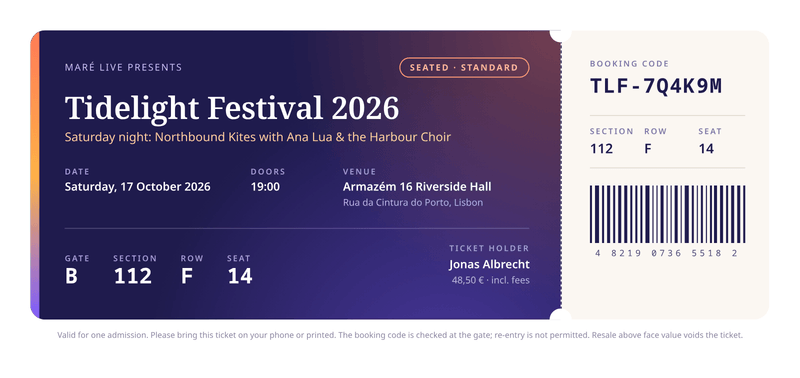
Each booking gets its own ticket with the guest’s name, seating details and booking code. It prints on any home printer and reads well on a phone.
Making them from your own data? Read how the PDF generation API works or the ticket PDF generator page.
- 210 × 99 mm
- 1 page
- Free to start
What this ticket template is for
Use it to issue tickets for events you run: concerts, festivals, conferences, theatre nights and workshops. Each booking gets its own ticket with the holder’s name, seating details and booking code.
The ticket measures 210 by 99 mm, a third of an A4 sheet. It shows well on a phone and prints on any home printer.
It is made for tickets you have the right to issue: your own events, or events you work with.
What a good event ticket includes
- The event name, the date and when the doors open.
- The venue and its address.
- Where to go: the gate and the seating details, such as row F, seat 14.
- The holder’s name and the ticket type.
- A unique booking code for checks at the door.
- Key conditions, such as re-entry and resale rules.
The fields it fills
Each field fills one part of your event ticket. Send new details and your event ticket keeps its design, or change both.
| Field | What it fills |
|---|---|
| General | |
currency | Currency for the price, such as EUR. |
locale | How the price is written, such as pt-PT. |
| Event | |
event.presenter | Who presents the event. |
event.name | The event name. |
event.lineup | The line-up or programme. |
event.date | The date of the event. |
event.time_zone | The time zone of the venue. |
event.doors | When the doors open. |
event.venue | The venue name. |
event.address | The venue address. |
event.conditions | The small print. |
| Ticket | |
ticket.type | The ticket type. |
ticket.gate | The entrance gate. |
ticket.section | The section. |
ticket.row | The row. |
ticket.seat | Where the holder sits, such as 14. |
ticket.price | The price paid. |
| Holder | |
holder.name | The ticket holder’s name. |
| Booking | |
booking.code | The booking code. |
booking.barcode | Digits printed under the stub. |
How to make your event ticket PDF
Two ways to get your event ticket. Make one by hand in the dashboard today. Connect your app when you want every event ticket made automatically.
No code: make it in the dashboard
- 1Sign up free. You don’t need a card.
- 2Pick the event ticket template.
- 3Put your own details into the event ticket’s sample data, and change the words and colours.
- 4Watch the free preview as you type. Every page carries a small “Preview” label.
- 5Verify your email and press Generate PDF for a clean copy. It counts as one PDF on your plan.
To make each event ticket from your own app instead, send your data with a live key, as shown here.
Automatic: one request from your app
Copy the template ID from the editor. Save your event ticket data in a file with that ID, then send it in one request. The reply is the finished PDF.
curl https://api.castpdf.com/v1/pdf \
  -H "Authorization: Bearer $CASTPDF_API_KEY" \
  -H "Content-Type: application/json" \
  -d @request.json \
--output ticket.pdf{
"template_id": "YOUR_TEMPLATE_ID",
"data": {
"currency": "EUR",
"locale": "pt-PT",
"event": {
"presenter": "Maré Live",
"name": "Tidelight Festival 2026",
"lineup": "Saturday night: Northbound Kites with Ana Lua & the Harbour Choir",
"date": "2026-10-17",
"time_zone": "Europe/Lisbon",
"doors": "19:00",
"venue": "Armazém 16 Riverside Hall",
"address": "Rua da Cintura do Porto, Lisbon",
"conditions": "Valid for one admission. Please bring this ticket on your phone or printed. The booking code is checked at the gate; re-entry is not permitted. Resale above face value voids the ticket."
},
"ticket": {
"type": "Seated · Standard",
"gate": "B",
"section": "112",
"row": "F",
"seat": "14",
"price": 48.5
},
"holder": {
"name": "Jonas Albrecht"
},
"booking": {
"code": "TLF-7Q4K9M",
"barcode": "4 8219 0736 5518 2"
}
}
}Make it yours
- Add your event artwork or logo as an image.
- Swap the colours to match your event.
- For a code people can scan, make the image in your ticket system and send it with each ticket.
- Remove the seating fields for standing events.
- Every save is a new version, and your last 50 versions are kept.
Printed at the right size
The page is the ticket itself, 210 by 99 mm, so it prints at the right size with nothing cut off.
The tear-off stub repeats the booking code and seating details. The barcode-style strip on the sample is drawn from the digits you send. It is decorative and cannot be scanned.
Questions about event ticket PDFs
What size is an event ticket?
How do I make tickets with sequential numbers?
How do I create event tickets for free?
Can I add a QR code or barcode?
Can each ticket show its own seating details and name?
Can people print tickets at home?
You might also need
Certificate
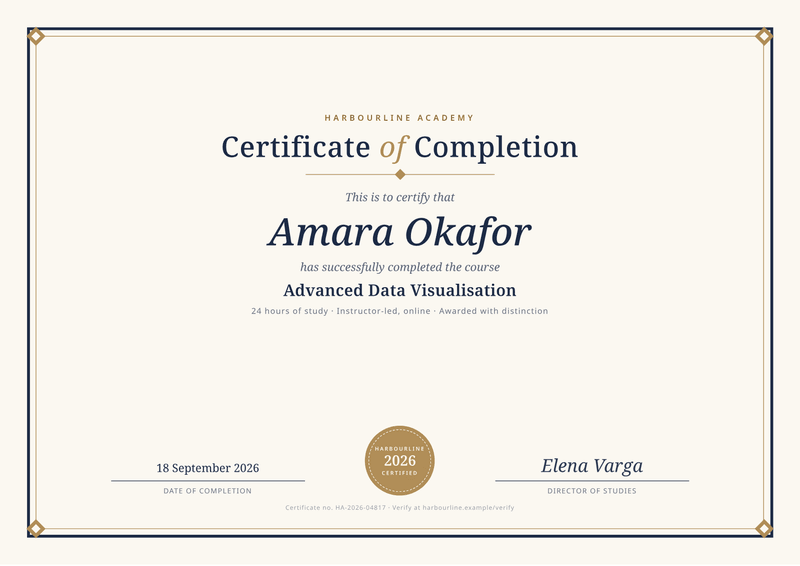
A4, landscapeA personal certificate for every learner, with name, course and date.
Make your first event ticket PDF
Sign up free and this template is ready for you. Add your logo and details, and download your first event ticket in minutes. You get 100 free PDFs every month, and you don’t need a card.