Who fills contracts this way
Businesses that sign the same kind of agreement many times a month, where only the client and the commercial terms change. Three examples:
- An agency service agreement. A data agency signs retainers with new clients every few weeks. Its sales tool already holds the client’s legal name, the monthly fee and the agreed deliverables, so the agreement can be built from that record.
- A freelancer’s project agreement. A designer sends an agreement the moment a client accepts a proposal on her website. The project name, price and deadline flow straight into the contract.
- An equipment rental agreement. A sound and lighting hire company issues an agreement with every booking. The schedule lists each item, the hire dates and the deposit, and the customer signs before collection.
In each case the clauses were written once and approved. What used to take time was copying client details into a word processor and hoping nobody changed a clause along the way.
What a generated contract needs
Generating contracts from data adds a few needs that a hand-made contract does not have:
- Wording a lawyer has approved. The template holds your text. Data should only fill names, figures and dates, never rewrite a clause.
- Exact legal names. Use the registered company name and number from your records, not a trading name typed by a salesperson.
- A unique agreement number. It links the PDF to the client record, the invoice and the signed copy later.
- Numbers that cannot drift. Clause numbers and page numbers should come from the layout, so adding a clause never leaves a wrong reference.
- A clear place to sign. Signature blocks with the signer’s name and role, kept together on one page.
- A record of the version. You should be able to say which wording each client received, months later.
Sample wording, not legal advice
The clauses in the contract starter are placeholder text for illustration. Nothing on this page is legal advice. Have a qualified lawyer review any agreement before you send it, or paste in a contract you already use.
What the contract starter lays out
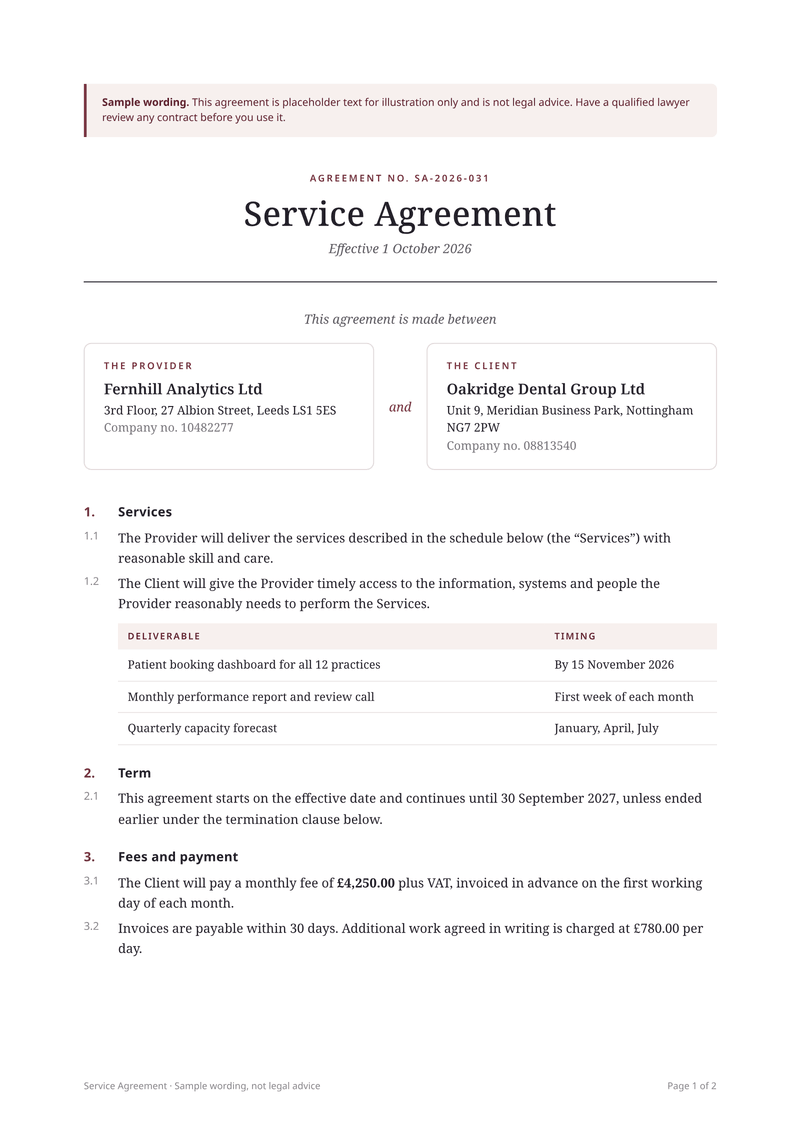
The starter is a two-party service agreement on A4. It opens with the agreement number, the title and the effective date. Two boxes name the provider and the client, each with an address and a company number.
Eight numbered clauses follow, from the services to the governing law. The first clause holds a table of deliverables and their timing, built from the list you send. Fees, payment days, the day rate, the notice period and the end date are all filled from your data.
At the end, a signature block for each signer shows a line to sign on, the signer’s name, their title and a blank date. A banner at the top and the footer both say the wording is a sample. Remove them once your own approved text is in place.
Send it from your sales flow
- Put your own wording in the template. Sign up free, open the contract starter and replace the sample clauses with your approved text. Mark the parts that change as fields, such as
{{ client.name }}. - Preview it with a real client. Fill the sample data with a past client’s details in Simple mode and check every page of the preview. Show it to whoever approves your contracts.
- Pin the approved version. Pin that version in the dashboard’s versions menu. Later edits create new versions but do not change what your requests render until you pin again.
- Request the PDF when a deal closes. When a deal is marked as won, send the client’s data to
POST /v1/pdfwith the agreement number as theIdempotency-Key. - Pass it to your signing tool. Upload the returned PDF to the e-signature service you already use, through its own API, or email it for a wet signature.
{
  "template_id": "5b7e2c91-3f4a-4d86-a1c0-9e2f6b8d4a17",
  "template_version": 7,
  "data": {
    "currency": "GBP",
    "locale": "en-GB",
    "agreement": { "number": "SA-2026-044", "effective": "2026-11-01", "end": "2027-10-31", "notice_days": 30, "governing_law": "England and Wales" },
    "provider": { "name": "Fernhill Analytics Ltd", "address": "27 Albion Street, Leeds LS1 5ES", "company_number": "10482277" },
    "client": { "name": "Harbour & Vale Opticians Ltd", "address": "14 Quay Road, Bristol BS1 4QA", "company_number": "11930562" },
    "fees": { "monthly": 2900, "day_rate": 780, "payment_days": 14 },
    "deliverables": [{ "name": "Monthly sales dashboard", "timing": "By 1 December 2026" }],
    "signers": [
      { "party": "Fernhill Analytics Ltd", "name": "Hannah Whitcombe", "title": "Managing Director" },
      { "party": "Harbour & Vale Opticians Ltd", "name": "Megan Price", "title": "Director" }
    ]
  },
  "filename": "SA-2026-044.pdf",
  "response": "url"
}
Sending template_version is optional when a version is pinned. Naming it in the request makes the approved wording explicit in your own code, and the document record keeps it either way.
Details the template takes care of
- Clauses that renumber. Clause and sub-clause numbers such as 3 and 3.2 come from the stylesheet, not from your text. Delete a clause and every number after it moves up.
- Clauses for some clients only. Wrap an extra clause, such as data processing terms, in a Liquid
ifblock. Clients without it get a contract with no gap in the numbering. - Page X of Y. Every page shows "Page 2 of 3" in the bottom right corner, so a missing page in a printed copy is obvious.
- Headings that stay with their text. Clause headings are styled not to sit alone at the foot of a page, so a heading moves to the next page with its first paragraph.
- Signature blocks kept whole. The signature section carries the
keep-togetherclass, so the lines to sign stay on one page where they fit. - A long schedule. A schedule with many deliverables or rental items runs onto the next page without splitting a row, and its header row repeats there.
- Awkward names. A client called "Harbour & Vale" prints exactly as written. Data is escaped, so symbols in a name cannot break the layout.
Our guide to page breaks in HTML to PDF shows the same rules if you build a contract layout of your own.
Every client gets the approved wording
Contracts change slowly and on purpose. Each save of a template creates a new numbered version, and old versions are never edited.
CastPDF keeps the latest 50 versions plus the pinned one. Each document records the template version that produced it, and the document log keeps that record for 120 days. Save the version number with the client record in your own system too, so you can answer "which wording did this client get?" years later.
The PDF link expires after your plan’s storage time, so keep the signed copy in your own records. For a rental business with different terms, make a second template rather than piling conditions into one.
Read the contract template page for every field. Each agreement counts as one PDF however many pages it runs to, and the Free plan includes 100 live PDFs a month.
The data it needs, and one request
This is the real sample data of the service agreement template. Save your template in the dashboard, copy its ID, and send data in this shape. The reply is the finished PDF.
curl https://api.castpdf.com/v1/pdf \
  -H "Authorization: Bearer $CASTPDF_API_KEY" \
  -H "Content-Type: application/json" \
  -d @request.json \
--output contract.pdf{
"template_id": "YOUR_TEMPLATE_ID",
"data": {
"currency": "GBP",
"locale": "en-GB",
"agreement": {
"number": "SA-2026-031",
"effective": "2026-10-01",
"end": "2027-09-30",
"notice_days": 30,
"governing_law": "England and Wales"
},
"provider": {
"name": "Fernhill Analytics Ltd",
"address": "3rd Floor, 27 Albion Street, Leeds LS1 5ES",
"company_number": "10482277"
},
"client": {
"name": "Oakridge Dental Group Ltd",
"address": "Unit 9, Meridian Business Park, Nottingham NG7 2PW",
"company_number": "08813540"
},
"fees": {
"monthly": 4250,
"day_rate": 780,
"payment_days": 30
},
"deliverables": [
{
"name": "Patient booking dashboard for all 12 practices",
"timing": "By 15 November 2026"
},
{
"name": "Monthly performance report and review call",
"timing": "First week of each month"
},
{
"name": "Quarterly capacity forecast",
"timing": "January, April, July"
}
],
"signers": [
{
"party": "Fernhill Analytics Ltd",
"name": "Hannah Whitcombe",
"title": "Managing Director"
},
{
"party": "Oakridge Dental Group Ltd",
"name": "Rajesh Menon",
"title": "Chief Operating Officer"
}
]
}
}