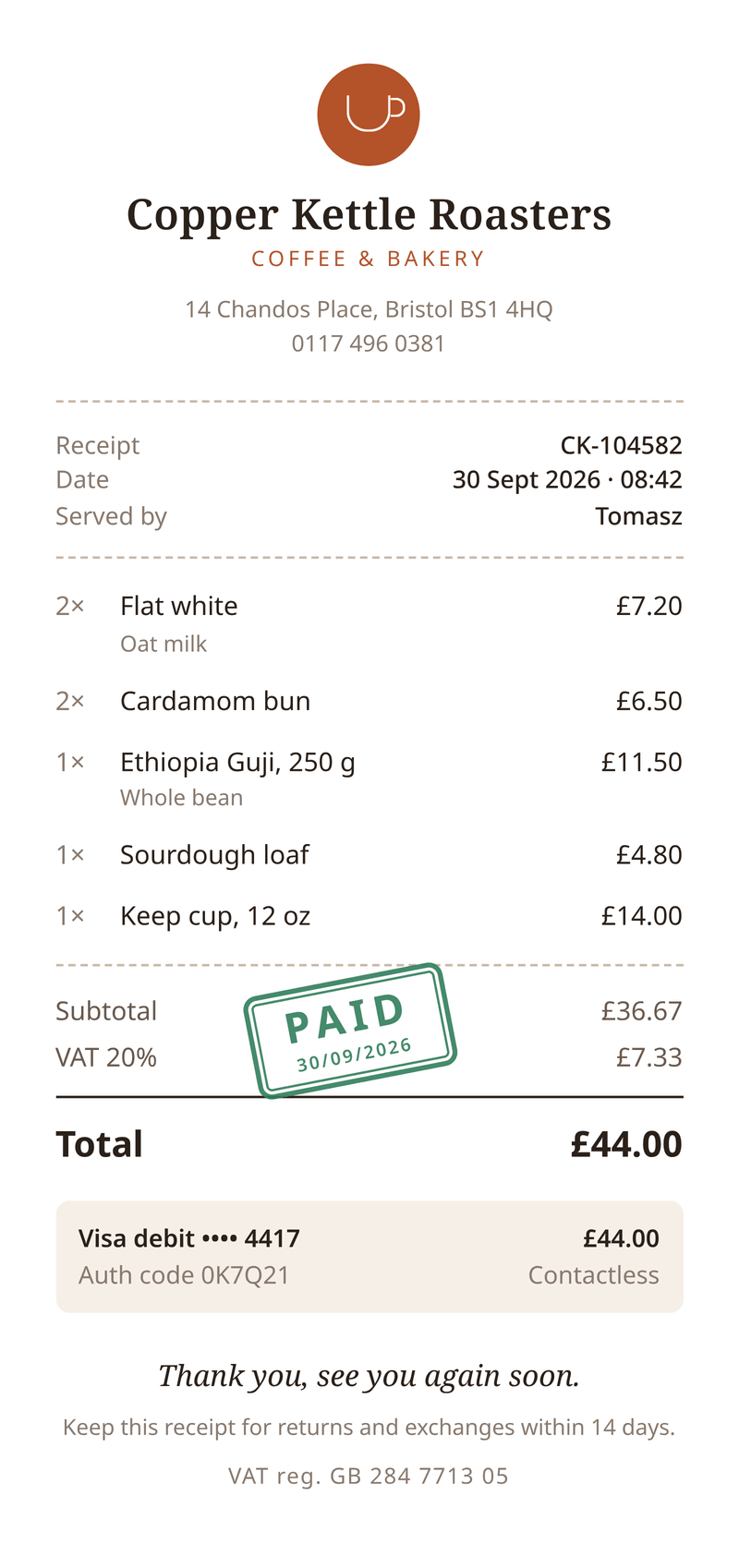
Who sends receipts this way
Anyone who takes a payment and wants the customer to have proof of it, without printing anything. Three common setups:
- An online shop emails a receipt the moment the card payment succeeds. The order confirmation links to the PDF, and the customer can download it again later.
- A café or a market stall with a tablet till shows a QR code or emails the receipt instead of printing paper slips. The narrow layout reads well on a phone.
- A booking or membership app sends a receipt for each renewal, so members have something to hand to their own accounts team.
In each case the receipt describes a sale your business really made. Use your own shop’s name and details: CastPDF is not a tool for making receipts for other stores.
What a good receipt includes
- Your business name, address and, if you charge VAT, your VAT number.
- A receipt number and the date and time of the sale.
- Each item with its quantity and price, so the customer can match it to what they bought.
- The VAT rate and the VAT amount, shown apart from the net total.
- The total paid and how it was paid, for example the last four digits of the card.
- Your returns rule in one line, so nobody has to ask.
Rules differ by country. In the UK, for example, a simplified VAT receipt is allowed for smaller sales. Check what your country asks for with your accountant; this page is general information, not tax advice.
Send it from your checkout
The pattern is the same whatever your stack. When your payment provider confirms a payment, your server builds the receipt data from the order and asks CastPDF for the PDF.
- Pick the receipt template. Sign up free, choose the receipt starter, and change the shop details, colours and wording in the editor.
- Map your order to the fields. Your order already has the items, quantities and prices. Copy them into the same shape as the sample data below.
- Request the PDF after payment. Send
template_idanddatatoPOST /v1/pdfwith"response": "url". Use the order number as theIdempotency-Key, so a retry never makes a second receipt. - Send the link. Put the returned
urlin your confirmation email, or store the PDF. The link works without an API key until it expires.
Prefer to start by hand? Fill in the sample data in the dashboard and press Generate PDF. It is the same template, so nothing changes when you automate it later.
The awkward cases, handled
- Prices that include VAT. The template treats each price as VAT-inclusive and works out the net amount and the VAT from the rate you send. You never round on your side.
- Other currencies. Send
currencyandlocale, such as GBP and en-GB or EUR and de-DE. Amounts are written the local way, with the right symbol. - Long item names. A name such as "Ethiopia Guji, 250 g, whole bean" wraps onto a second line instead of running off the slip.
- A big basket. The slip is 80 mm wide. When the items run past the bottom, the receipt continues on a second slip and no row is cut in half. Add the class
keep-togetherto the totals block to keep the subtotal, VAT and total on one slip. - Notes on a line. Add a short
noteto an item, such as "Oat milk", and it prints under the item name in a smaller size.
When you need an invoice instead
A receipt says a sale is paid. An invoice asks for payment, with a due date and bank details. Business customers often want an invoice even after paying, so many shops send both. Start from the invoice template for that, or read the receipt template page for every field this one fills.
Test PDFs are free and unlimited. Live receipts count one PDF each, whatever their length, and the Free plan includes 100 a month with no card needed.
The data it needs, and one request
This is the real sample data of the receipt template. Save your template in the dashboard, copy its ID, and send data in this shape. The reply is the finished PDF.
curl https://api.castpdf.com/v1/pdf \
  -H "Authorization: Bearer $CASTPDF_API_KEY" \
  -H "Content-Type: application/json" \
  -d @request.json \
--output receipt.pdf{
"template_id": "YOUR_TEMPLATE_ID",
"data": {
"currency": "GBP",
"locale": "en-GB",
"shop": {
"name": "Copper Kettle Roasters",
"tagline": "Coffee & bakery",
"street": "14 Chandos Place",
"city": "Bristol BS1 4HQ",
"phone": "0117 496 0381",
"vat_number": "GB 284 7713 05"
},
"receipt": {
"number": "CK-104582",
"date": "2026-09-30",
"time": "08:42",
"served_by": "Tomasz",
"vat_rate": 20,
"thanks": "Thank you, see you again soon.",
"returns": "Keep this receipt for returns and exchanges within 14 days."
},
"payment": {
"method": "Visa debit •••• 4417",
"auth_code": "0K7Q21"
},
"items": [
{
"name": "Flat white",
"note": "Oat milk",
"quantity": 2,
"price": 3.6
},
{
"name": "Cardamom bun",
"quantity": 2,
"price": 3.25
},
{
"name": "Ethiopia Guji, 250 g",
"note": "Whole bean",
"quantity": 1,
"price": 11.5
},
{
"name": "Sourdough loaf",
"quantity": 1,
"price": 4.8
},
{
"name": "Keep cup, 12 oz",
"quantity": 1,
"price": 14
}
]
}
}