How to use the CSV to PDF
- Add your CSV. Choose a
.csvfile, or paste the rows into the box. The first row is the header. - Give it a title. Optional. The title prints above the table and names the downloaded file.
- Check the orientation. Auto picks landscape for more than six columns. Choose portrait or landscape to override it.
- Convert and download. Press Convert to PDF and the table downloads as a PDF.
What the PDF looks like
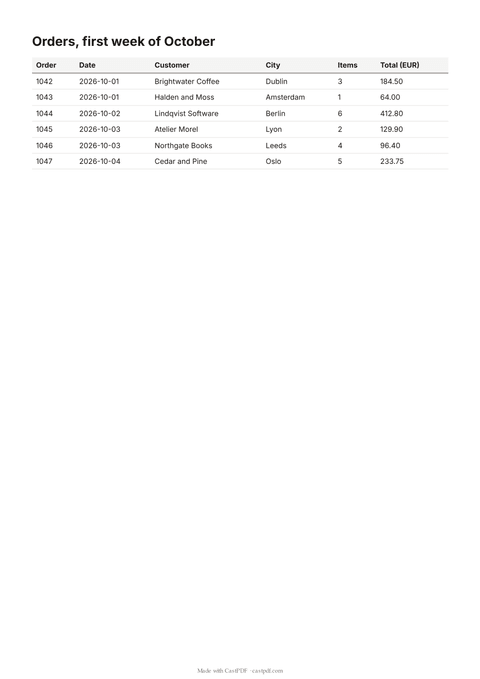
Each CSV row becomes a table row, in the order of the file. The header row prints in bold and repeats at the top of every page, so page four is as easy to read as page one. Rows never split across a page break.
Long text wraps inside its cell instead of running off the page. Numbers are printed exactly as they appear in your file, so a total of 184.50 stays 184.50. Nothing is rounded or reformatted.
CSV files it reads
- Files separated by commas, semicolons or tabs, with a header row, as Excel, Numbers and most databases export them.
- Quoted values with commas, quotes or line breaks inside them.
- UTF-8 text, so names such as Zoë, Łódź and 東京 print correctly.
- Up to 500 rows and 50 columns, and 500 KB in total.
Exporting from a spreadsheet? Use "CSV UTF-8" in Excel, or File, Download, CSV in most online sheets. The file is read in your browser and sent only when you press the button.
Getting a clean table
- Keep one header row. Merged or stacked headers from a report export become extra rows.
- Delete empty columns before you export; they still take space on the page.
- Format dates and amounts in the spreadsheet, because the PDF prints the text exactly as the CSV holds it.
- Put long notes in the last column, so the short columns stay easy to scan.
A title such as the period or the account name helps whoever reads the printout later. It also becomes the file name, so the download is easy to find.
One table, or one PDF per row?
This converter makes one PDF with all the rows in a table. That suits order lists, stock counts and attendance sheets. If you need one document per row instead, such as one certificate per student or one invoice per customer, that is a different job.
The API does it with a batch: save a template once, upload the same CSV, and get a ZIP with one PDF per row. The certificate generator page shows that workflow from start to finish.
Limits of the free tool
| Input | Up to 500 KB, 500 rows and 50 columns |
|---|---|
| Output | A PDF table of up to 20 pages on A4 |
| Not supported | Excel files (save as CSV first) and formulas |
| How often | 10 requests a minute and 100 a day from one address |
| On every PDF | A small "Made with CastPDF" line in the footer |
Automate this
Doing this every week? The same engine runs behind the CastPDF API, with no footer on paid plans and 100 free PDFs a month to start.
With the API
Read the CSV in your own code and send it as an HTML table to POST /v1/pdf, or render a saved template with the rows as data.
From a spreadsheet
Upload the CSV or XLSX to POST /v1/spreadsheets/parse, then send the rows as a batch to get one PDF per row in a ZIP.
In a no-code workflow
- CastPDF node for n8nAvailable
- Zapier appIn review
- Any tool with an HTTP step