How to use the E-invoice validator
- Choose the file. An XRechnung or other EN 16931 XML in CII or UBL, or a ZUGFeRD or Factur-X PDF, up to 5 MB.
- Or paste the XML. Paste XML straight into the box if you do not have it as a file.
- Validate. Press Validate. A PDF is opened on our server only to take out the XML inside it.
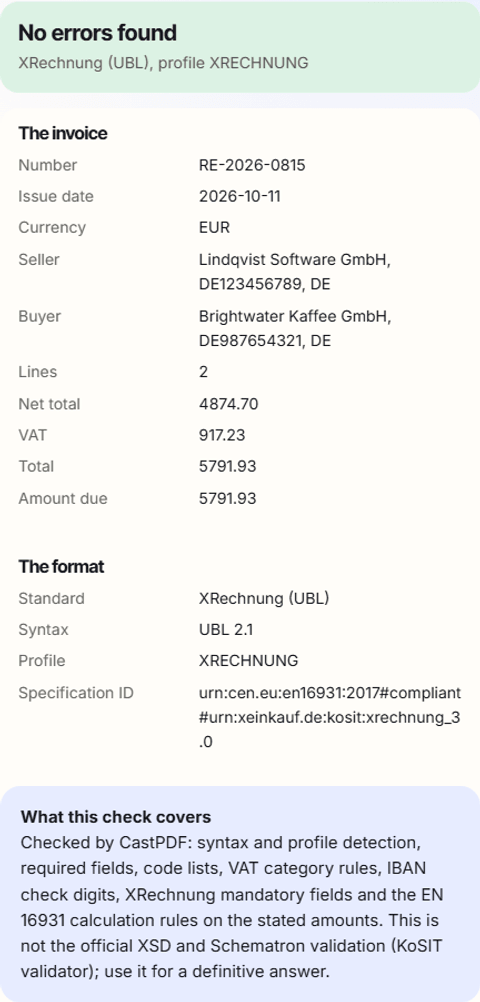
- Read the report. Errors come first, each with the rule and the field. Warnings follow, then a summary of the invoice.
What this validator checks
- The syntax (CII or UBL), the document type and the profile, from the specification identifier (BT-24).
- Required fields for the profile, and for XRechnung the German rules such as the buyer reference and seller contact.
- Codes against their official lists: countries, currencies, units, VAT categories and payment means.
- VAT category rules, such as a reason for an exempt line and the buyer’s VAT number for reverse charge.
- The amounts under EN 16931: line totals, the VAT breakdown per rate and the totals BR-CO-10 to BR-CO-17.
- For a PDF: the embedded XML file, the PDF/A part and the Factur-X metadata it declares.
Each problem names the rule where there is one, such as BR-CO-15, and the field, such as totals.tax_total. The message says what is wrong and what the value should be.
What it does not check
This tool reads the invoice back into our own model and runs our checks. It does not run the XSD schemas and the official Schematron rules, which is what the KoSIT validator does. For a definitive answer before a portal submission, run the KoSIT validator or ask your receiver.
For a PDF it reads only the PDF/A identification, not the whole file against PDF/A-3; veraPDF does that. MINIMUM and BASIC WL files have no invoice lines, so only their header and totals are checked.
The errors it finds most often
| Problem | Rule | The usual fix |
|---|---|---|
| VAT a cent off | BR-CO-17 or the VAT breakdown | Compute VAT once per rate, not per line |
| No buyer reference in an XRechnung | BR-DE-15 | Add the Leitweg-ID or another buyer reference |
| Seller contact missing | BR-DE-2, BR-DE-6, BR-DE-7 | Add a contact name, phone and email |
| Line totals do not add up | BR-CO-10 | Check the sum of the line net amounts |
| A plain PDF with no XML | none | Generate a real ZUGFeRD or Factur-X file |
A file full of errors usually comes from a tool that writes the XML separately from the PDF, or that rounds differently. The e-invoice generator builds both from one calculation.
Limits of the free tool
| Input | One XML or PDF file of up to 5 MB |
|---|---|
| Output | A report of errors, warnings and the invoice summary |
| Not supported | The official XSD and Schematron validation, and full PDF/A checks |
| How often | 10 requests a minute and 100 a day from one address |
| On every PDF | A small "Made with CastPDF" line in the footer |
Automate this
Doing this every week? The same engine runs behind the CastPDF API, with no footer on paid plans and 100 free PDFs a month to start.
With the API
Create e-invoices that pass these checks from the start: send e_invoice to POST /v1/pdf, documented in the API reference.
From a spreadsheet
The validator checks one file at a time. To create many e-invoices, call the API once per invoice from your billing system.
In a no-code workflow
- CastPDF node for n8nAvailable
- Zapier appIn review
- Any tool with an HTTP step