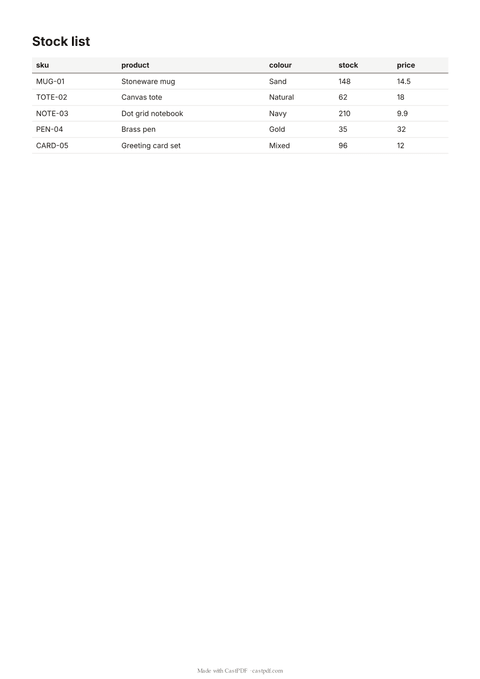
How to use the JSON to PDF
- Paste a JSON array. An array of objects, such as
[{ "sku": "MUG-01", "stock": 148 }]. The sample is a product list. - Check it parses. The tool checks the JSON in your browser first and points to the line with a missing comma or quote.
- Add a title. Optional. It prints above the table and names the file.
- Convert and download. Press Convert to PDF to get the table as a PDF.
The JSON shapes it understands
| Your JSON | The table |
|---|---|
| An array of objects | One row per object; the columns are every key, in the order first seen |
| An array of arrays | The first array is the header row; each further array is a row |
| Nested objects or arrays in a value | Printed as compact JSON inside the cell |
| Missing keys in some objects | An empty cell, so the columns stay aligned |
A single object, or an array of plain numbers, has no rows and columns to show. Wrap a single record in square brackets to print it as a one-row table.
A table, or a designed document?
This tool answers a simple question: what is in this JSON? It prints the data as it is, as a neat table. That is perfect for exports, audits and handing data to a colleague.
When the JSON describes a document, such as an order that should look like an invoice, you want a template instead. A template places each value where it belongs, with your logo and layout. The JSON to PDF guide shows how a template turns the same data into a finished page.
Where the JSON usually comes from
- An API response. Copy the array from your browser’s network panel or from a tool such as curl.
- A database export. Most databases can export a query result as a JSON array of rows.
- A no-code tool. Automation tools often pass data along as JSON; paste a sample to see it as a table.
If the array sits inside a larger object, copy only the array. For example, take the value of items from { "items": [ ... ] }.
Tips for a clean result
- Keep keys short: they become the column headings.
- Remove fields nobody needs to read, such as internal ids, before you convert.
- Format numbers in your data the way you want them printed; the tool does not round.
- More than six columns? The table prints in landscape automatically.
Limits of the free tool
| Input | Up to 500 KB, 500 rows and 50 columns |
|---|---|
| Output | A PDF table of up to 20 pages on A4 |
| Not supported | A single object or a plain list of values as the top level |
| How often | 10 requests a minute and 100 a day from one address |
| On every PDF | A small "Made with CastPDF" line in the footer |
Automate this
Doing this every week? The same engine runs behind the CastPDF API, with no footer on paid plans and 100 free PDFs a month to start.
With the API
Send the JSON as data to a saved template on POST /v1/pdf; the template decides the layout. The quickstart shows the first request.
From a spreadsheet
Many records at once? Send them as a batch: one item per record, one PDF each, all in one ZIP.
In a no-code workflow
- CastPDF node for n8nAvailable
- Zapier appIn review
- Any tool with an HTTP step