How to use the Invoice generator
- Enter your business. Your name, address, email and VAT or tax number, exactly as they should print.
- Enter your customer. Their name, address and VAT number if they have one.
- Add the line items. A description, a quantity, a unit price and a VAT rate per line. Add up to 100 lines.
- Set the number and dates. Your invoice number, the issue date, the due date and your bank details.
- Create the PDF. Press Create invoice PDF. The totals and the VAT breakdown are calculated, and the PDF downloads.
What the generator works out for you
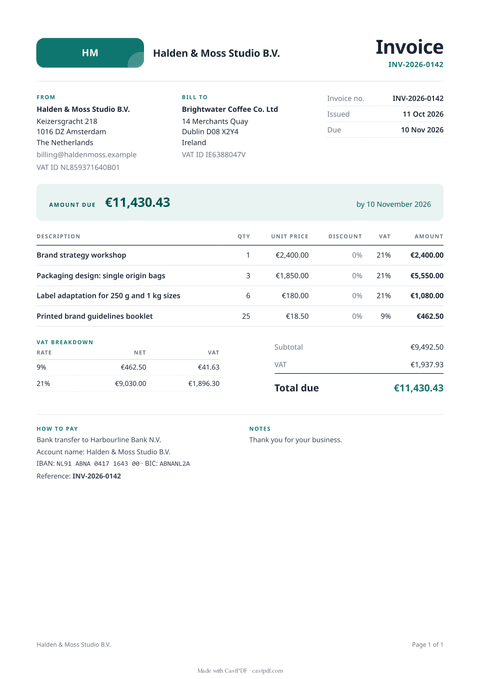
- Each line total: quantity times unit price.
- The subtotal of all lines before VAT.
- A VAT breakdown with one row per rate, so 21 % and 9 % lines are shown apart.
- The total due, formatted in your currency.
You only type the inputs. The template does the arithmetic, so a changed quantity never leaves a wrong total behind. Long invoices continue onto more pages with the table header repeated and page numbers at the bottom.
What a valid invoice includes
The exact rules depend on your country, but most tax offices in Europe expect the same core details. The form asks for each of them:
- A unique, sequential invoice number and the issue date.
- Your full name and address, and your VAT number if you are registered.
- Your customer’s name and address, and their VAT number for business sales within the EU.
- What you sold, how many, the price and the VAT rate for each line.
- The VAT amount per rate and the total due, plus when and how to pay.
Selling to businesses in Germany or France? From 2027 a plain PDF stops being enough for many of them. The e-invoice generator makes a ZUGFeRD or XRechnung file instead.
Your logo, and your data
Add a PNG, JPEG, WebP or SVG logo of up to 150 KB and it prints at the top of the invoice. Without one, the invoice shows your initials in a neat badge. The logo is read in your browser and sent with the invoice, never loaded from another website.
Nothing you type is saved by us. The invoice is rendered once and the PDF comes straight back to you, so keep your own copy. If you want invoices kept, numbered and sent for you, that is what the API and the dashboard do.
Limits of the free tool
| Input | Up to 100 line items and 64 KB of text; a logo of up to 150 KB |
|---|---|
| Output | A PDF invoice of up to 20 pages on A4 |
| Not supported | Saving invoices, numbering them for you, or sending them |
| How often | 10 requests a minute and 100 a day from one address |
| On every PDF | A small "Made with CastPDF" line in the footer |
Automate this
Doing this every week? The same engine runs behind the CastPDF API, with no footer on paid plans and 100 free PDFs a month to start.
With the API
Save the invoice template in your account and send each invoice as JSON to POST /v1/pdf. The invoice PDF from JSON guide walks through it.
From a spreadsheet
Invoices for a whole list of customers? Upload a CSV or XLSX and make one invoice per row with a batch.
In a no-code workflow
- CastPDF node for n8nAvailable
- Zapier appIn review
- Any tool with an HTTP step