How to use the E-invoice generator
- Pick the format. ZUGFeRD or Factur-X for a PDF with the XML inside; XRechnung CII or UBL for the XML alone.
- Fill in both parties. Names, addresses, VAT numbers and an email for each side. XRechnung also needs the buyer reference (Leitweg-ID) and a seller phone.
- Add the lines. A name, a quantity, a unit, a net price and a VAT rate per line, up to 100 lines.
- Create and download. Press Create e-invoice. If something is missing, each problem is shown next to its field.
Which format to pick
| Format | You get | Pick it for |
|---|---|---|
| ZUGFeRD (EN 16931) | PDF/A-3b with factur-x.xml inside | German business customers |
| Factur-X (EN 16931) | PDF/A-3b with factur-x.xml inside | French customers and their approved platforms |
| XRechnung UBL | XML file | German public buyers whose portal takes UBL |
| XRechnung CII | XML file | German public buyers whose portal takes CII |
Not sure? ZUGFeRD is the safe choice for businesses, because people can still read the PDF. Public buyers tell you which XRechnung syntax they want. The ZUGFeRD vs XRechnung comparison explains the difference.
How the totals are calculated
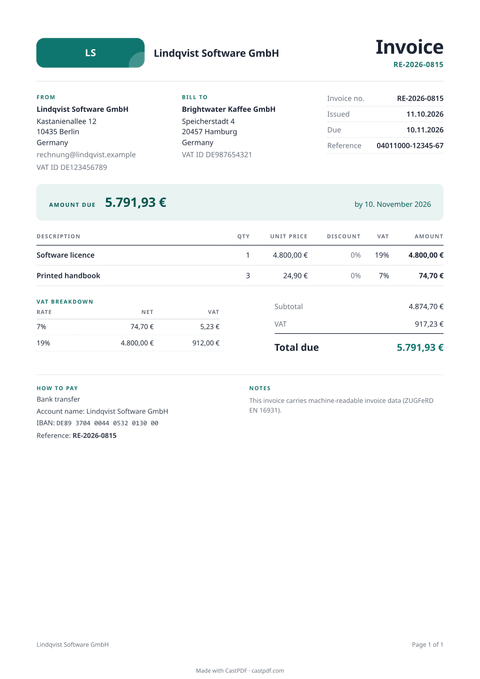
You enter net prices. Each line is quantity times price, rounded to cents. VAT is then computed once per rate on the sum of the lines with that rate, as EN 16931 requires. That is why our totals pass the validators that reject so many hand-made e-invoices.
The same numbers go onto the PDF page and into the XML. A hybrid e-invoice where the page and the XML disagree is a common reason for rejection, and it cannot happen here.
When the form is not complete
Before making anything, the generator checks the invoice: required fields, country and currency codes, the VAT rules and the IBAN check digits. Every problem is shown next to the field it belongs to, all at once, in plain English. Fix them and press the button again.
XRechnung asks for more than ZUGFeRD: the buyer reference, a seller contact with a phone number and email addresses for both sides. The sample already has them, so you can switch the format and try it.
Run a test invoice past your customer or their portal before you rely on it. Files built the same way passed the KoSIT validator in our tests, but a receiver may have rules of its own.
Limits of the free tool
| Input | Up to 100 lines |
|---|---|
| Output | A ZUGFeRD or Factur-X PDF/A-3b, or an XRechnung XML |
| Not supported | Discounts, credit notes and exemption reasons (available in the API) |
| How often | 10 requests a minute and 100 a day from one address |
| On every PDF | A small "Made with CastPDF" line in the footer |
Automate this
Doing this every week? The same engine runs behind the CastPDF API, with no footer on paid plans and 100 free PDFs a month to start.
With the API
Send the same invoice as JSON in e_invoice to POST /v1/pdf from your billing system. The ZUGFeRD and XRechnung guide has the full request.
From a spreadsheet
Many invoices? Loop over your records and send one e_invoice request each; every request returns one finished e-invoice.
In a no-code workflow
- CastPDF node for n8nAvailable
- Zapier appIn review
- Any tool with an HTTP step