How to use the HTML to PDF converter
- Paste your HTML. A fragment such as a table, or a full document with its own
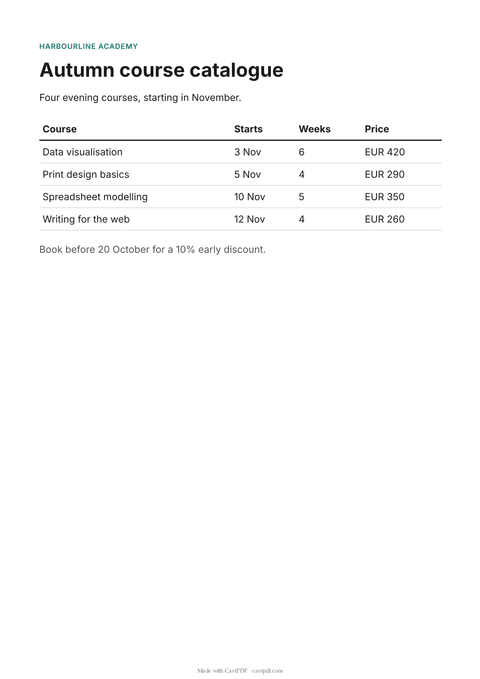
<head>. The sample shows a course catalogue. - Add CSS if you need it. Open the CSS box and paste your styles. They are added before your HTML, like a stylesheet.
- Pick the paper. Choose A4, Letter, A5 or Legal, and portrait or landscape.
- Convert and download. Press Convert to PDF. A short human check runs in the background, then the PDF downloads.
What this converter does
The converter loads your HTML in Chromium, the browser engine behind Chrome, and prints it to PDF. Fonts, flexbox, grid and modern CSS behave the way they do in your browser. What you see in a print preview is close to what you get.
It is meant for one-off documents: a page you built in a hurry, a table from a report, a printable version of an email. When the same document is needed again and again with new data, that is what the PDF generation API is for.
Print CSS that works here
break-inside: avoidon a row or a card keeps it on one page.break-before: pagestarts a new page, for a cover or a chapter.theadrepeats on every page when a table runs long.@page { margin: 20mm; }sets the margins from your CSS.@media printrules apply, so you can hide navigation or buttons.
The print CSS guide explains each rule with examples. Running headers and page numbers need print mode, which the API offers; this free converter uses the faster screen-style mode.
When the PDF does not look right
- The page is cut off on the right. A fixed width such as
width: 1200pxis wider than the paper. Use percentages ormax-width: 100%instead. - A table row is split in half. Add
tr { break-inside: avoid; }so each row stays on one page. - The background colours are missing. Add
-webkit-print-color-adjust: exact;to the elements that need their colour. - The text is tiny. Set a font size in points, such as
body { font-size: 11pt; }, since paper has no screen width to scale to.
These fixes work the same in the API, so a page that looks right here will look right in production.
What the converter will not do
Scripts in your HTML do not run, and nothing is fetched from other websites. Images from the web are left out; embed them as data: URLs instead. These rules keep the free tool safe for everyone, and they mean a page renders the same way every time.
Every PDF carries a small "Made with CastPDF" line at the bottom of each page. PDFs from the API on a paid plan do not.
Limits of the free tool
| Input | Up to 200 KB of HTML and CSS |
|---|---|
| Output | A PDF of up to 20 pages, A4, Letter, A5 or Legal |
| Not supported | Scripts, and images or fonts from other websites |
| How often | 10 requests a minute and 100 a day from one address |
| On every PDF | A small "Made with CastPDF" line in the footer |
Automate this
Doing this every week? The same engine runs behind the CastPDF API, with no footer on paid plans and 100 free PDFs a month to start.
With the API
Send the same HTML and CSS to POST /v1/pdf with your API key. The quickstart has the request in curl, Node.js and Python.
From a spreadsheet
Save the HTML as a template with Liquid fields, then make one PDF per row of a CSV or XLSX file with a batch.
In a no-code workflow
- CastPDF node for n8nAvailable
- Zapier appIn review
- Any tool with an HTTP step