What is inside the certificate of achievement template
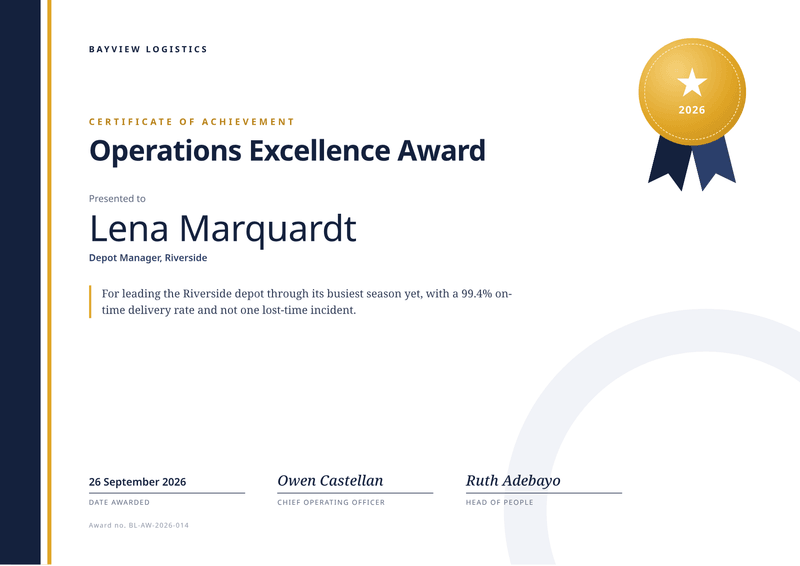
- Issuer. Your organisation’s name, or your logo, at the top left.
- Award title. The name of the award in large, heavy type.
- Winner. "Presented to", the winner’s name and their role or team.
- Citation. One sentence on the achievement, set off by a gold rule.
- Medal. A gold medal with ribbons and the year, drawn on the page.
- Date and signatures. The date awarded and each signatory with their role.
What this award certificate template is for
Use it for staff awards, sales prizes, competition winners, sports results and school achievements. It is the certificate for doing something well, not just for finishing it.
The design is modern and left-aligned. A dark band runs down the left edge and a gold medal with ribbons sits top right. The award title is large, and a citation explains the achievement in one sentence.
Two people can sign, such as a manager and a director. Add more names to the list of signatories, or keep just one.
Every winner gets the same polished layout with their own details. That makes it easy to run a whole award night from one list of names.
What a good certificate of achievement includes
- The award name, written the way people will say it.
- The winner’s name, large and spelled correctly.
- A role or team, so others know who they are.
- One sentence on what they achieved, with a number if you have one.
- The date it was awarded.
- Signatures from people who matter to the winner.
- An award number, if you keep a record of awards.
The fields it fills
Each field fills one part of your certificate of achievement. Send new details and the certificate of achievement keeps its design. Leave out an optional field and its line simply disappears.
| Field | What it fills |
|---|---|
| General | |
certificate_id | An award number for your records. |
presented_on | The date of the award. The medal shows its year. |
locale | How the date is written, such as en-GB. |
| Issuer | |
issuer.name | Your organisation’s name (your brand settings win). |
| Award | |
award.title | The name of the award. |
award.citation | One sentence on what the winner achieved. |
| Recipient | |
recipient.name | The winner’s name. |
recipient.team | Their role or team. |
| Signatories | |
signatories[].name | Who signs, one entry per person. |
signatories[].title | Their role. |
Make it automatically
Use the template in the dashboard once, then let your systems fill it. Every way below uses the same template, so a change to the design shows up everywhere.
From your app, with the API
One request per certificate of achievement: the template id and your data in, the finished PDF out. Add deliver.email and CastPDF emails it too. The PDF endpoint.
From a spreadsheet
Upload a CSV or XLSX file with one row per winner. One batch makes every PDF and hands them back in one ZIP. PDFs from a spreadsheet.
In a no-code workflow
- CastPDF node for n8nAvailable
- Zapier appIn review
- Make appIn review
- Any tool that can send a web request
One request from your app
Copy the template id from the editor and save it with your data in request.json. Then send the file. The reply is the finished PDF.
curl https://api.castpdf.com/v1/pdf \
  -H "Authorization: Bearer $CASTPDF_API_KEY" \
  -H "Content-Type: application/json" \
  -d @request.json \
  --output certificate-of-achievement.pdf
import { readFile, writeFile } from 'node:fs/promises';
const res = await fetch('https://api.castpdf.com/v1/pdf', {
method: 'POST',
headers: {
Authorization: `Bearer ${process.env.CASTPDF_API_KEY}`,
'Content-Type': 'application/json',
},
body: await readFile('request.json', 'utf8'),
});
if (!res.ok) throw new Error((await res.json()).error.message);
await writeFile('certificate-of-achievement.pdf', Buffer.from(await res.arrayBuffer()));import json, os
import requests
with open("request.json") as f:
body = json.load(f)
res = requests.post(
"https://api.castpdf.com/v1/pdf",
headers={"Authorization": f"Bearer {os.environ['CASTPDF_API_KEY']}"},
json=body,
timeout=60,
)
res.raise_for_status()
with open("certificate-of-achievement.pdf", "wb") as f:
f.write(res.content){
"template_id": "YOUR_TEMPLATE_ID",
"data": {
"certificate_id": "BL-AW-2026-014",
"presented_on": "2026-09-26",
"locale": "en-GB",
"issuer": {
"name": "Bayview Logistics"
},
"award": {
"title": "Operations Excellence Award",
"citation": "For leading the Riverside depot through its busiest season yet, with a 99.4% on-time delivery rate and not one lost-time incident."
},
"recipient": {
"name": "Lena Marquardt",
"team": "Depot Manager, Riverside"
},
"signatories": [
{
"name": "Owen Castellan",
"title": "Chief Operating Officer"
},
{
"name": "Ruth Adebayo",
"title": "Head of People"
}
]
}
}New to the API? The quickstart gets you from a free key to your first PDF in about five minutes.
Make one without code
- Sign up free. You do not need a card. "Use this template" opens the editor with this template ready.
- Open the certificate of achievement template. Put your own details into the certificate of achievement’s sample data, and change the words and colours.
- Check the preview. It updates as you type and is free. Every page carries a small “Preview” label.
- Generate the PDF. Verify your email and press Generate PDF for a clean copy. It counts as one PDF on your plan.
Make it yours
- Write the citation like a headline: what they did, then the result.
- Change the band and medal colours with your brand colour and accent.
- Try a long award title in the sample to see how it wraps.
- For a team award, put the team name in the winner field and the members in the citation.
- Every save is a new version, and your last 50 versions are kept.
One design, any page size
Award certificates get printed on A4, on US Letter, framed, or sent as a file. Margins change from printer to printer.
This design scales as one piece with the page. Change the format or the margins in the template settings and it still fills exactly one page, with nothing cut off.
The medal, the band and the faint ring in the corner scale too. The page keeps its balance at every size.
Questions about certificate of achievement templates
What is the difference between a certificate of achievement and a certificate of completion?
What should an award certificate say?
Can I make award certificates for a whole team at once?
Can I add a signature image?
Can I change the medal?
Is it free to make award certificates?
Can I use it for school or sports awards?
More templates
- Certificate · A4, landscape
Certificate
A personal certificate for every learner, with name, course and date. - Certificate · A4, landscape
Certificate of attendance
Proof someone attended: event, dates, hours and CPD points. - Business · A4, portrait
Sales report
A multi-page report where every page has its header and page number.