What is inside the certificate of attendance template
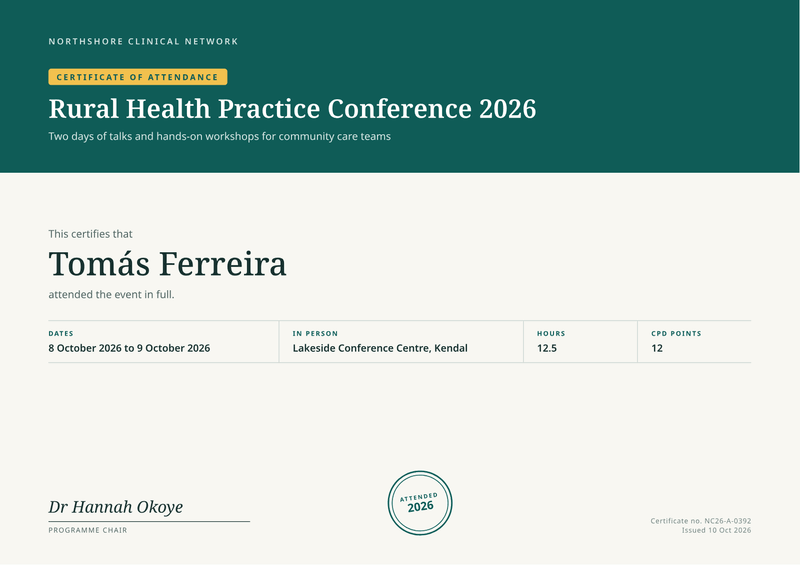
- Event header. The organiser, a label and the event name with a subtitle, on a coloured block.
- Attendee. "This certifies that", the attendee’s name and a line confirming attendance.
- Event facts. Dates, place or format, hours and CPD points in one labelled row.
- Signature. The organiser’s signature with name and role.
- Stamp and reference. A round stamp with the year, the certificate number and the issue date.
What this attendance certificate template is for
Use it for conferences, workshops, webinars, seminars and training days. Many professions ask members to log learning hours, and a certificate of attendance is their record.
A coloured header carries the event name and a short subtitle. Under the attendee’s name, a row of facts shows the dates, the place or online format, the hours and the CPD points.
The organiser signs at the bottom left. A round stamp shows the year, and the certificate number sits at the bottom right.
What a good certificate of attendance includes
- The attendee’s name, as they registered.
- The event name and who organised it.
- The date, or the first and last day for longer events.
- Where it took place, or that it was online.
- Hours or CPD points, when your attendees need them.
- A signature from the organiser or programme lead.
- A certificate number and the date it was issued.
The fields it fills
Each field fills one part of your certificate of attendance. Send new details and the certificate of attendance keeps its design. Leave out an optional field and its line simply disappears.
| Field | What it fills |
|---|---|
| General | |
certificate_id | A unique certificate number. |
issued_on | The date the certificate was issued. |
locale | How dates and numbers are written, such as en-GB. |
| Organiser | |
organiser.name | Who ran the event (your brand settings win). |
| Event | |
event.name | The event name. |
event.subtitle | One line on what the event was. |
event.start | The first day. |
event.end | The last day (the same as the first for one day). |
event.format | In person or Online, the label above the place. |
event.location | The venue and town, or the platform. |
event.hours | Learning hours (optional). |
event.cpd_points | CPD points (optional). |
| Attendee | |
attendee.name | The attendee’s name. |
| Signatory | |
signatory.name | Who signs. |
signatory.title | Their role. |
Make it automatically
Use the template in the dashboard once, then let your systems fill it. Every way below uses the same template, so a change to the design shows up everywhere.
From your app, with the API
One request per certificate of attendance: the template id and your data in, the finished PDF out. Add deliver.email and CastPDF emails it too. The PDF endpoint.
From a spreadsheet
Upload a CSV or XLSX file with one row per attendee. One batch makes every PDF and hands them back in one ZIP. PDFs from a spreadsheet.
In a no-code workflow
- CastPDF node for n8nAvailable
- Zapier appIn review
- Make appIn review
- Any tool that can send a web request
One request from your app
Copy the template id from the editor and save it with your data in request.json. Then send the file. The reply is the finished PDF.
curl https://api.castpdf.com/v1/pdf \
  -H "Authorization: Bearer $CASTPDF_API_KEY" \
  -H "Content-Type: application/json" \
  -d @request.json \
  --output certificate-of-attendance.pdf
import { readFile, writeFile } from 'node:fs/promises';
const res = await fetch('https://api.castpdf.com/v1/pdf', {
method: 'POST',
headers: {
Authorization: `Bearer ${process.env.CASTPDF_API_KEY}`,
'Content-Type': 'application/json',
},
body: await readFile('request.json', 'utf8'),
});
if (!res.ok) throw new Error((await res.json()).error.message);
await writeFile('certificate-of-attendance.pdf', Buffer.from(await res.arrayBuffer()));import json, os
import requests
with open("request.json") as f:
body = json.load(f)
res = requests.post(
"https://api.castpdf.com/v1/pdf",
headers={"Authorization": f"Bearer {os.environ['CASTPDF_API_KEY']}"},
json=body,
timeout=60,
)
res.raise_for_status()
with open("certificate-of-attendance.pdf", "wb") as f:
f.write(res.content){
"template_id": "YOUR_TEMPLATE_ID",
"data": {
"certificate_id": "NC26-A-0392",
"issued_on": "2026-10-10",
"locale": "en-GB",
"organiser": {
"name": "Northshore Clinical Network"
},
"event": {
"name": "Rural Health Practice Conference 2026",
"subtitle": "Two days of talks and hands-on workshops for community care teams",
"start": "2026-10-08",
"end": "2026-10-09",
"format": "In person",
"location": "Lakeside Conference Centre, Kendal",
"hours": 12.5,
"cpd_points": 12
},
"attendee": {
"name": "Tomás Ferreira"
},
"signatory": {
"name": "Dr Hannah Okoye",
"title": "Programme Chair"
}
}
}New to the API? The quickstart gets you from a free key to your first PDF in about five minutes.
Make one without code
- Sign up free. You do not need a card. "Use this template" opens the editor with this template ready.
- Open the certificate of attendance template. Put your own details into the certificate of attendance’s sample data, and change the words and colours.
- Check the preview. It updates as you type and is free. Every page carries a small “Preview” label.
- Generate the PDF. Verify your email and press Generate PDF for a clean copy. It counts as one PDF on your plan.
Make it yours
- For a one-day event, send the same start and end date and only one date prints.
- Leave out the hours or the CPD points and their boxes disappear.
- For a webinar, set the format to Online and name the platform as the location.
- Add your logo and organiser name once, in the brand settings.
- Use the subtitle for the theme of the event or the name of a track.
- Every save is a new version, and your last 50 versions are kept.
Ready for learning records
Attendees often upload certificates to a professional body or an employer. Those systems look for the same facts every time: who, what, when and how many hours.
This design puts those facts in one row with clear labels. CastPDF prints the hours and points you send. Whether a body accepts them is up to that body, so check its rules.
The whole design scales with the page. A4, US Letter and wider margins all still give exactly one page, so attendees can print it at home.
Questions about certificate of attendance templates
What is a certificate of attendance?
What should a certificate of attendance include?
How do I send attendance certificates after an event?
Can I show CPD points?
Does it work for online events?
What size is a certificate of attendance?
Can I give a certificate for one session of a longer event?
More templates
- Certificate · A4, landscape
Certificate
A personal certificate for every learner, with name, course and date. - Certificate · A4, landscape
Certificate of achievement
A bold award certificate with a medal and two signatures. - Business · 210 × 99 mm
Event ticket
A printable ticket with seating details and a tear-off stub.