What is inside the quote template
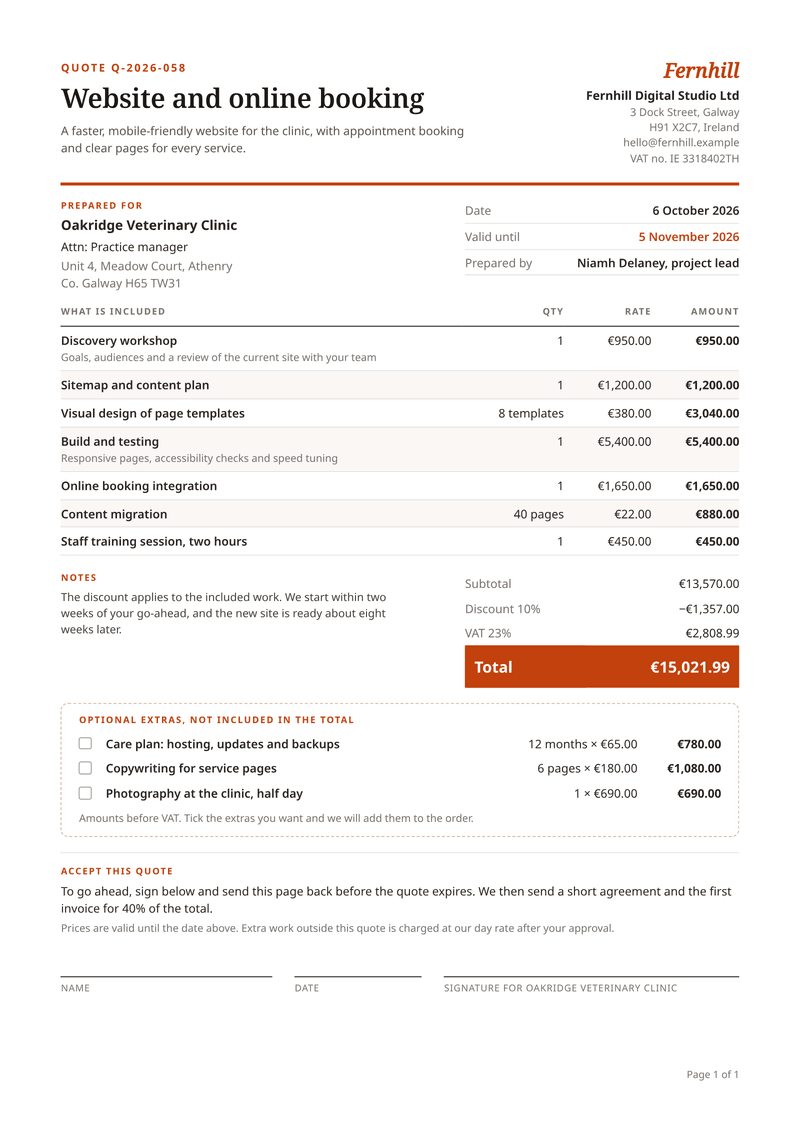
- Job summary. The quote number, a short title and one sentence on what the work is.
- Client and dates. Who it is for, the date, the valid-until date and who prepared it.
- Included work. Each line with quantity, unit and rate. These lines make up the total.
- Discount, VAT, total. One discount in percent, the VAT for each rate and the total in a bold bar.
- Optional extras. Priced lines with tick boxes, kept out of the total.
- Acceptance. Name, date and signature lines for the client.
What this quote template is for
Use it to price a job before it starts. Agencies, studios, builders, repair firms and consultants send quotes or estimates every week. The words differ by trade, but the paper is the same.
Each line has a quantity, a unit and a rate. Lines you mark as optional move to their own box and stay out of the total. One discount in percent applies to the included work, and the VAT follows from there.
The bottom of the page is an acceptance block. The client writes a name, a date and a signature, then sends the page back to you.
What a good quote includes
- A quote number, so both sides can refer to it later.
- The date and a valid-until date, after which prices may change.
- Who it is for, and who prepared it.
- A short summary of the job in plain words.
- Each piece of work with its quantity and rate.
- Any discount, the tax and the total, each on its own row.
- Optional extras, priced but kept out of the total.
- How to accept, and what happens after that.
The fields it fills
Each field fills one part of your quote. Send new details and the quote keeps its design. Leave out an optional field and its line simply disappears.
| Field | What it fills |
|---|---|
| General | |
currency | Currency for every amount, such as EUR. |
locale | How numbers and dates are written, such as en-IE. |
| Seller | |
seller.name | Your business name (your brand settings win). |
seller.short | A short name shown as a word mark, when you have no logo. |
seller.address | Your address, one line per line. |
seller.email | Where the client can reply. |
seller.tax_id | Your VAT number. |
| Client | |
client.name | The client’s name. |
client.contact | Who it is for at the client (optional). |
client.address | The client’s address. |
| Quote | |
quote.number | The quote number. |
quote.title | The job in a few words, shown as the heading. |
quote.summary | One sentence on what the client gets. |
quote.issued | The date of the quote. |
quote.valid_until | The last day the prices stand. |
quote.prepared_by | Who prepared it. |
quote.discount | A discount on the included work, in percent (0 for none). |
quote.notes | A note beside the totals, such as timing. |
quote.acceptance | How to accept and what happens next. |
quote.terms | Your small print. |
| Items | |
items[].description | A piece of work, one line each. |
items[].detail | A short note under the line (optional). |
items[].quantity | How many. |
items[].unit | The unit, such as pages or months (optional). |
items[].unit_price | The rate for one unit, before VAT. |
items[].vat_rate | The VAT rate of the line, in percent. |
items[].optional | true for an extra the client can add, kept out of the total. |
Make it automatically
Use the template in the dashboard once, then let your systems fill it. Every way below uses the same template, so a change to the design shows up everywhere.
From your app, with the API
One request per quote: the template id and your data in, the finished PDF out. Add deliver.email and CastPDF emails it too. The PDF endpoint.
From a spreadsheet
Upload a CSV or XLSX file with one row per quote. One batch makes every PDF and hands them back in one ZIP. PDFs from a spreadsheet.
In a no-code workflow
- CastPDF node for n8nAvailable
- Zapier appIn review
- Make appIn review
- Any tool that can send a web request
One request from your app
Copy the template id from the editor and save it with your data in request.json. Then send the file. The reply is the finished PDF.
curl https://api.castpdf.com/v1/pdf \
  -H "Authorization: Bearer $CASTPDF_API_KEY" \
  -H "Content-Type: application/json" \
  -d @request.json \
  --output quote.pdf
import { readFile, writeFile } from 'node:fs/promises';
const res = await fetch('https://api.castpdf.com/v1/pdf', {
method: 'POST',
headers: {
Authorization: `Bearer ${process.env.CASTPDF_API_KEY}`,
'Content-Type': 'application/json',
},
body: await readFile('request.json', 'utf8'),
});
if (!res.ok) throw new Error((await res.json()).error.message);
await writeFile('quote.pdf', Buffer.from(await res.arrayBuffer()));import json, os
import requests
with open("request.json") as f:
body = json.load(f)
res = requests.post(
"https://api.castpdf.com/v1/pdf",
headers={"Authorization": f"Bearer {os.environ['CASTPDF_API_KEY']}"},
json=body,
timeout=60,
)
res.raise_for_status()
with open("quote.pdf", "wb") as f:
f.write(res.content){
"template_id": "YOUR_TEMPLATE_ID",
"data": {
"currency": "EUR",
"locale": "en-IE",
"seller": {
"name": "Fernhill Digital Studio Ltd",
"short": "Fernhill",
"address": "3 Dock Street, Galway\nH91 X2C7, Ireland",
"email": "[email protected]",
"tax_id": "IE 3318402TH"
},
"client": {
"name": "Oakridge Veterinary Clinic",
"contact": "Attn: Practice manager",
"address": "Unit 4, Meadow Court, Athenry\nCo. Galway H65 TW31"
},
"quote": {
"number": "Q-2026-058",
"title": "Website and online booking",
"summary": "A faster, mobile-friendly website for the clinic, with appointment booking and clear pages for every service.",
"issued": "2026-10-06",
"valid_until": "2026-11-05",
"prepared_by": "Niamh Delaney, project lead",
"discount": 10,
"notes": "The discount applies to the included work. We start within two weeks of your go-ahead, and the new site is ready about eight weeks later.",
"acceptance": "To go ahead, sign below and send this page back before the quote expires. We then send a short agreement and the first invoice for 40% of the total.",
"terms": "Prices are valid until the date above. Extra work outside this quote is charged at our day rate after your approval."
},
"items": [
{
"description": "Discovery workshop",
"detail": "Goals, audiences and a review of the current site with your team",
"quantity": 1,
"unit": "",
"unit_price": 950,
"vat_rate": 23,
"optional": false
},
{
"description": "Sitemap and content plan",
"quantity": 1,
"unit": "",
"unit_price": 1200,
"vat_rate": 23,
"optional": false
},
{
"description": "Visual design of page templates",
"unit": "templates",
"quantity": 8,
"unit_price": 380,
"vat_rate": 23,
"optional": false
},
{
"description": "Build and testing",
"detail": "Responsive pages, accessibility checks and speed tuning",
"quantity": 1,
"unit": "",
"unit_price": 5400,
"vat_rate": 23,
"optional": false
},
{
"description": "Online booking integration",
"quantity": 1,
"unit": "",
"unit_price": 1650,
"vat_rate": 23,
"optional": false
},
{
"description": "Content migration",
"unit": "pages",
"quantity": 40,
"unit_price": 22,
"vat_rate": 23,
"optional": false
},
{
"description": "Staff training session, two hours",
"quantity": 1,
"unit": "",
"unit_price": 450,
"vat_rate": 23,
"optional": false
},
{
"description": "Care plan: hosting, updates and backups",
"unit": "months",
"optional": true,
"quantity": 12,
"unit_price": 65,
"vat_rate": 23
},
{
"description": "Copywriting for service pages",
"unit": "pages",
"optional": true,
"quantity": 6,
"unit_price": 180,
"vat_rate": 23
},
{
"description": "Photography at the clinic, half day",
"optional": true,
"quantity": 1,
"unit": "",
"unit_price": 690,
"vat_rate": 23
}
]
}
}New to the API? The quickstart gets you from a free key to your first PDF in about five minutes.
Make one without code
- Sign up free. You do not need a card. "Use this template" opens the editor with this template ready.
- Open the quote template. Put your own details into the quote’s sample data, and change the words and colours.
- Check the preview. It updates as you type and is free. Every page carries a small “Preview” label.
- Generate the PDF. Verify your email and press Generate PDF for a clean copy. It counts as one PDF on your plan.
Make it yours
- Set the discount to 0 and the discount row disappears.
- Mark a line with optional: true to move it into the extras box.
- Retitle it "Estimate" if that is the word your trade uses.
- Put your deposit or payment schedule in the acceptance text.
- Every save is a new version, and your last 50 versions are kept.
Optional extras that do not inflate the price
Clients like choice, but a quote that adds every idea to the total looks expensive. This template keeps the two apart.
Included lines make up the subtotal, the discount, the VAT and the total. Optional lines sit in a dashed box with tick boxes and prices before VAT. The client ticks what they want, and you add it to the order.
Questions about quote templates
What is the difference between a quote and an estimate?
What should a quotation include?
How long should a quote be valid?
Can I turn an accepted quote into an invoice?
Can clients sign the quote online?
Is there a free estimate generator?
Are the rates shown with or without VAT?
More templates
- Billing · A4, portrait
Invoice
Get paid faster: discounts, VAT per line and totals worked out for you. - Billing · A4, portrait
Proforma invoice
Ask for payment up front, before the goods leave. - Business · A4, portrait
Service agreement
Your own agreement, filled in for each client, ready to sign.